Invoice the same day the job is done, because the job sheet is complete with photos and signature, and see how many jobs each person closes a day.
Back to AI App Development
Field crews & couriers · 04 / 13
Field service and delivery app
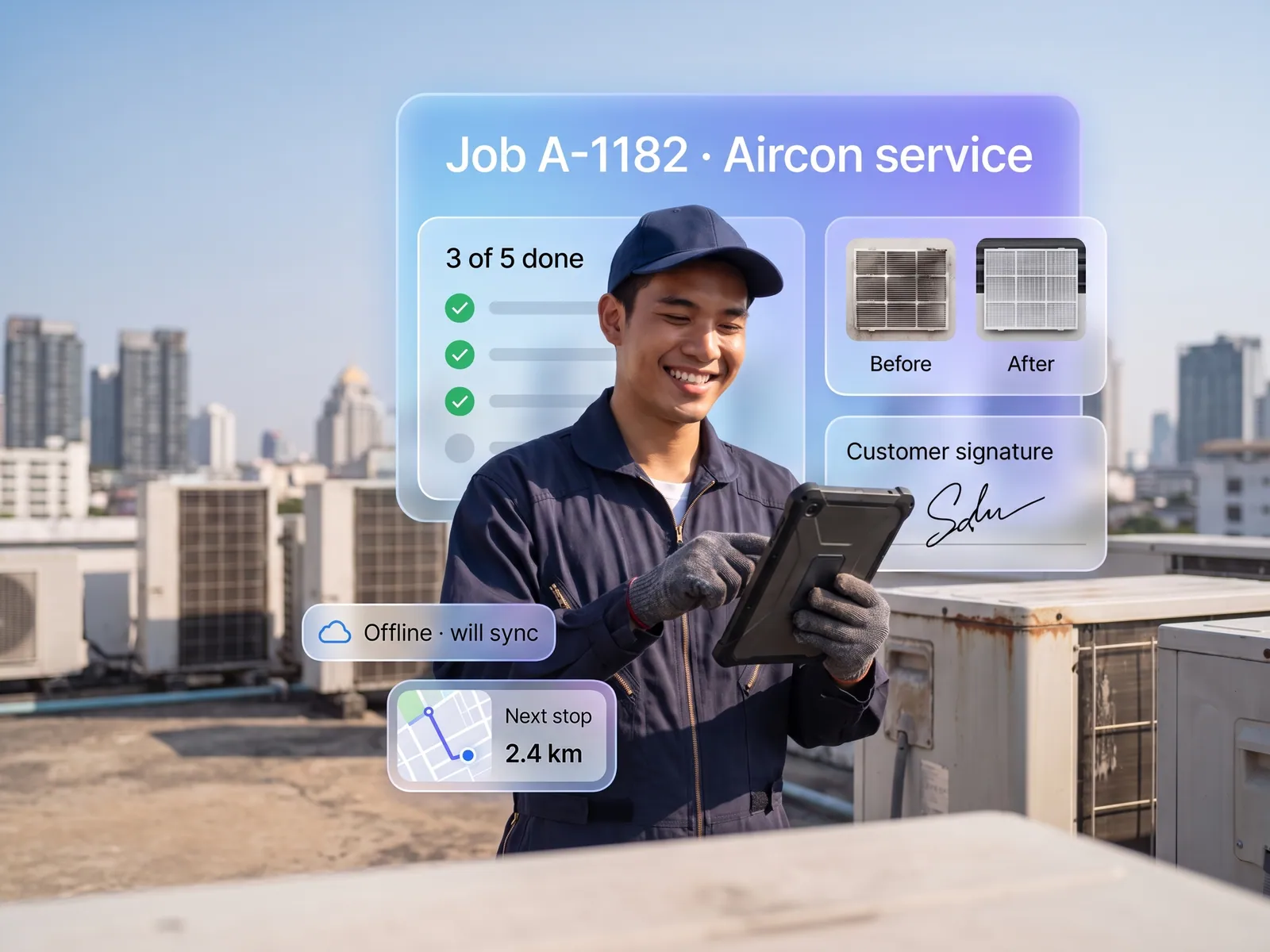
Staff take the job, photograph it, collect a signature and close it on site. Everything lands on that customer’s job sheet, even when the signal drops.
 Field crews & couriers
 “Technicians send photos from site into a LINE group. Finding which job belongs to which customer means scrolling back through hundreds of messages.”
The problem
Field work starts at the office and ends in a LINE group. The technician gets the address by chat in the morning, goes out, does the job and sends photos back into the same group as ten other jobs. In the evening an admin works out which photo belongs to which house and types it into Excel for invoicing. A photo nobody can find is a job that gets paid late, and when a customer says the technician never came, there is no signature to argue with.
The manager has no idea who is where right now, which jobs are done and which technician is still looking for the house. They find out when the customer phones to ask why nobody has arrived.
How we solve it
We build an app the technician opens in the morning to see the whole day in route order. They tap to navigate, take photos before starting, take another set when done, have the customer sign on the screen and close the job. All of it lands on that customer’s job sheet with time and location. In a basement or out of coverage, the app holds everything and sends it when the signal comes back.
The system reads the photos and the technician’s short notes, drafts a completion report in plain words the customer can follow, sends it over LINE, and passes the completed job sheet to the accounting system ready to invoice. The manager sees on a map who is where and which jobs have overrun, and gets an alert when a technician has not started a job that should be under way.
A job the technician extends on site, say a worn part found during the visit, needs the manager’s approval before the extra goes on the bill, and the invoice is issued only when someone in accounts confirms it. The system prepares everything; decisions about money stay with people.
How it runs
Work comes in from
- Job sheets from the office or ERP
- Photos and signatures from site
- Technician location and time
- Technician’s short notes
What the AI does
- Order the day by route
- Attach photos and signatures to the job
- Draft the completion report
- Flag jobs running past time
Where it lands
- Each customer’s job sheet
- Report to the customer over LINE
- Accounting system for invoicing
- Manager’s job map
Before and after
Before
After
Every house’s photos in one LINE group, sorted by an admin in the evening
Photos and signature filed to that house’s job the moment they are taken
A customer says the technician never came, and there is no proof
A report with before and after photos and the signature reaches the customer by itself
The manager learns a job has slipped when the customer phones
The map shows who is where, with an alert before a job overruns
What you get
- 01
A staff app with today’s jobs in route order, each with the address, contact number and what needs doing at that stop
- 02
Before and after photos, a signature on the screen and job close-out on site, all filed to that customer’s job sheet by itself
- 03
Works without signal and syncs on its own when the connection returns, with nothing to re-enter
- 04
The system reads the photos and the technician’s notes, drafts the completion report for the customer and alerts when a job runs past its time
- 05
A manager screen with job locations, team status and the job sheets ready to invoice, connected to the accounting system
Who gets what
Connected to the ERP or accounting system through its API, read-only first. Offline data is encrypted on the device, and staff location is recorded only during working hours, as agreed under PDPA.
Technicians stop typing reports at night: photograph, close, go home. Admins stop hunting for photos in the LINE group.
Who this fits
Air-con & solar installersBuilding maintenance servicesTransport & distributionPest control & cleaning companiesSales reps visiting retailers
Connects with what you already run
Google MapsLINE OAExisting ERPPEAKFlowAccountGoogle Sheets
Development process
- 1
Discover
Requirements, users and success metrics, with scope and price fixed before we start.
- 2
Design
UX and system architecture; the prototype is approved before anything is built.
- 3
Build
AI-accelerated sprints with a demo every week, reviewed by senior engineers.
- 4
Test
QA, security and performance verified against the agreed scope.
- 5
Launch & care
Production deploy, team training, and a monthly care plan.

Turn your business problem into a system that works for you
Tell us today — get an executive-ready proposal with the plan and budget.
Talk to an engineer about thisMore solutions in AI App Development
See the whole service Brands & retailers Customer app Shops with regulars Loyalty and membership app Appointment businesses Booking and queue app Management & HR Internal operations app Brands with a LINE OA LINE Mini App (LIFF) Businesses that must know their customer e-KYC and digital ID verification Schools & institutes School management system Tutoring schools & exam bodies Online testing platform Restaurants & cafés Restaurant POS and ordering Hotels & resorts Guest app and hotel booking Condo & estate management Resident app for juristic persons Clinics & hospitals Patient app and appointments