IT teams and companies using ChatGPT or Claude · 18 / 18
Connect your ERP, CRM and company databases to ChatGPT and Claude with an MCP server
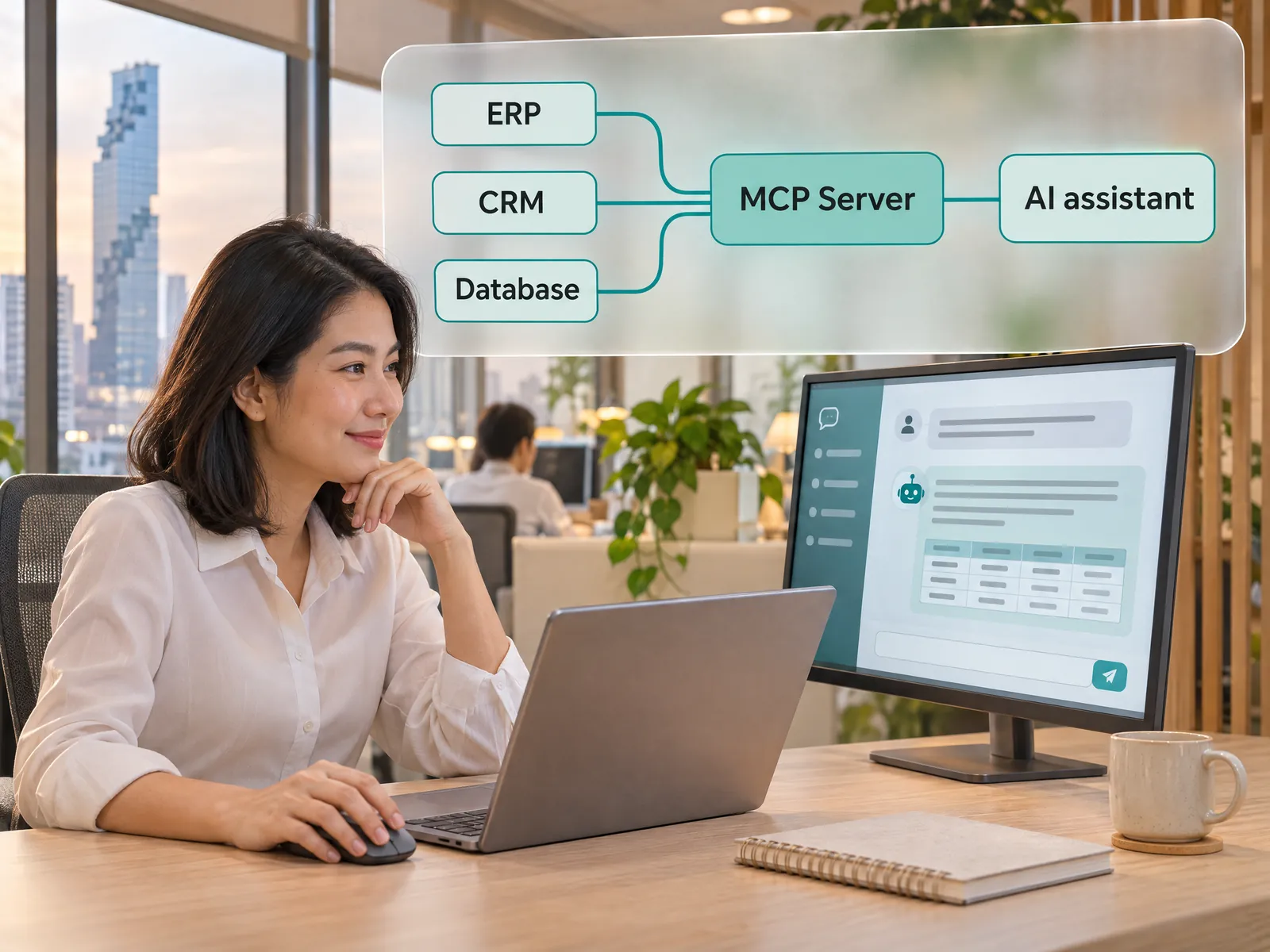
An MCP server is the go-between that lets ChatGPT or Claude look up data in your ERP, CRM and databases within each user’s permissions. We build it and install it on your systems.
“Staff copy sales figures out of the ERP and paste them into ChatGPT every day. Nobody knows how many customer files now sit in personal accounts, and whenever a file is out of date, every answer is wrong.”
The problem
Many companies already pay for ChatGPT or Claude for their teams, yet the AI only knows what staff paste into it. Anyone who wants sales figures or a customer’s history has to export a report from the ERP to Excel and upload it to the chat one file at a time. The numbers are at least a day behind the real system, and files with customer names and amounts end up spread across personal AI accounts that IT cannot see or delete.
When IT tries to connect things itself, the hard questions show up fast. Which tables should the AI see? Should a sales rep in Chiang Mai see the Bangkok branch’s figures? Who is responsible if the AI records something wrong? When an auditor asks where customer data has gone, can the company answer? Most projects stall at the pilot, or the AI ends up with far wider access than it should have.
How we solve it
MCP stands for Model Context Protocol, an open standard Anthropic published in late 2024 that ChatGPT, Claude and many other AI tools now support. An MCP server tells the AI which tools your systems offer, such as finding a customer, checking sales or looking up stock. When someone types a question in the chat, the AI picks the matching tool, and the MCP server checks that person’s permissions, pulls the data from the ERP or CRM and sends back only what the answer needs. The source data stays in your systems, and nobody has to paste files into a chat again.
We start from the questions your team asks most and design the tools around them. The first set is read-only and uses the API your ERP already has, such as the SAP Business One Service Layer or the Odoo API. Where a program has no API, we read from database views with a read-only account. People sign in with their company account, the MCP server checks their ERP permissions on every call, and an audit log records who called which tool with which values.
Once the team is comfortable with read-only use, we add write tools, such as drafting a quotation or logging a call note in the CRM. Each one is saved as a draft that a person confirms in the existing system. Multi-step follow-up work, like sending an email or routing an approval, goes to an n8n workflow. If some data must never leave the company, the same MCP server works with a private LLM running in-house.
How it runs
Work comes in from
ERP such as SAP Business One or Odoo
CRM and customer history
Company SQL databases
Documents in SharePoint or Google Drive
↓
What the AI does
MCP server checks the user’s access
Picks the tool that fits the question
Pulls only the fields the answer needs
Logs every request to the audit log
↓
Where it lands
Answers in ChatGPT or Claude
Tables with the source of each figure
Draft records in the ERP for sign-off
Follow-up in n8n, such as an email
Before and after
Before
After
×Staff export ERP reports to Excel and upload them to ChatGPT by hand
✓Ask in the chat and the AI pulls the latest figures from the ERP
×Customer files sit in personal AI accounts IT cannot see
✓Each person sees only what their ERP role allows
×Answers rest on yesterday’s numbers or the wrong file
✓IT can open the audit log and see who asked what, and when
What you get
01
An MCP server built on the Model Context Protocol that reaches your ERP, CRM and databases through official APIs, or database views with a read-only account, without changing those systems
02
A set of tools named and described so the AI picks the right one, such as find a customer, sales by branch, stock on hand and overdue invoices, each returning only the fields the answer needs
03
Sign-in with company accounts over OAuth, such as Microsoft 365 or Google Workspace, mapped to ERP roles so each person sees only their own branch, department or customers
04
Write tools, such as drafting a quotation or logging a meeting note in the CRM, kept apart from read tools, saved as drafts a person confirms in the existing system, and open to approved groups only
05
An audit log of every tool call showing who used which AI, what they asked for and what came back, plus rate limits, alerts on unusual calls and handover documents for your IT team
Examples
Connecting ChatGPT to your ERP and CRM: three jobs your team can do from the chat
Requests that sales, accounting and management make most often. Each one starts with read-only tools, and anything written back to a system needs a person to confirm it.
01
Ask ChatGPT for sales and stock figures from the ERP
An executive or branch manager asks about sales, best sellers or stock running low. The AI calls a tool that pulls the latest figures from the ERP, sums them up in a table and says which report each figure came from. Branch managers see only their own branch, while executives see all of them.
“What are this month’s sales by branch, and which products have less than two weeks of stock left?”
Brief yourself on a customer from the CRM with Claude
Before a customer visit, a sales rep asks Claude for a summary from the CRM: recent orders, open quotations and past complaints. After the meeting the AI drafts the call note, and the rep reads it and confirms it before it is saved to the CRM.
“Give me a summary of our biggest customer this month: what did they order last, which quotations are still open, and what have they complained about?”
Accounting asks which customers are past due. The AI pulls the list from the ERP, sorts it by amount and days overdue, and drafts a reminder for each customer. Emails go out only after a staff member approves them, through an n8n workflow that records who was sent what and when.
“Which customers are more than 30 days overdue? Sort them by amount and draft reminder emails for the top three.”
Sample data: the customer name and questions here are made up to show how it works.
What to prepare before building an MCP server
You can start talking before you have all of it. This list makes the first round shorter.
The ten questions your team would ask the AI most, written the way people actually type them
The names of the ERP, CRM or databases to connect, with API documents if you have them
A table of what each role should see, for example by branch, department or assigned customers
The ChatGPT or Claude plan your company uses, and an admin account for that plan
Where the MCP server will run: your company cloud or a server in your office
Who gets what
Business owner
Ask about sales, stock or overdue invoices in the chat you already use, get live figures from the real system without waiting for a report, and know that customer data is no longer piling up in someone’s personal account.
IT director
The MCP server runs in your cloud or on your servers, reaches existing systems through APIs or a read-only account, uses company sign-in over OAuth and logs every request. You decide which tools each group gets, without touching the ERP’s code.
The team using it every day
Sales prepares for a customer meeting in a few minutes, accounting checks overdue invoices without opening five screens, and everyone asks questions in plain Thai or English.
Who this fits
Companies already paying for ChatGPT or ClaudeCompanies that run on an ERP or CRMIT teams that must control AI access and logsExecutives who want to check figures themselvesCompanies with data across many systems and branches
Connects with what you already run
ChatGPTClaudeERP such as SAP Business One or OdooYour current CRMSQL Server, MySQL or PostgreSQLMicrosoft 365 or Google Workspacen8n
Development process
1
Discover
Requirements, users and success metrics, with scope and price fixed before we start.
2
Design
UX and system architecture; the prototype is approved before anything is built.
3
Build
AI-accelerated sprints with a demo every week, reviewed by senior engineers.
4
Test
QA, security and performance verified against the agreed scope.
5
Launch & care
Production deploy, team training, and a monthly care plan.
This website runs its own MCP server
DNA Maker runs an MCP server for this website at www.dnamaker.com/api/mcp, and any AI agent that supports MCP can connect without a key. It has four tools: list our services and solutions, read the details of a solution page, consult an AI engineer that runs on the same system as Dream, and leave a name and contact details for our team to follow up. The last one is the only tool that writes anything. Every tool has per-minute and per-day limits, and conversations with the AI engineer are recorded so our team can review them.
What is an MCP server, how is it built, is it safe: questions before you start
What is an MCP server, and how is it different from a normal API integration?
An MCP server is a go-between that tells the AI which tools your company systems offer, what each tool takes in and what it sends back, using the Model Context Protocol that ChatGPT, Claude and many other AI tools support. A classic API integration means writing code for each app, one connection at a time. An MCP server is built once, any AI that supports MCP can use it, and the AI chooses which tool to call based on the question. Behind the scenes, most MCP servers still call the ERP’s existing API. To see where MCP sits in a full AI system, read the 7 layers of an enterprise AI system.
How is an MCP server built, and how long does it take?
We collect the questions your team asks most, design tools around them, connect to the ERP or CRM through an API or a read-only account, and set up sign-in and per-user access. A small group then tries it with real questions in ChatGPT or Claude before everyone gets access. Timing depends on how many systems and tools are involved, and we agree it with you before work starts. The first set is read-only on one system, and write tools come in a later round.
Is it safe? Could the AI see data it shouldn’t, or change records on its own?
The MCP server checks permissions before it sends any data. People sign in with their company account and see only what their ERP role allows, so if the AI asks for more, it gets nothing. The first tools are read-only. Write tools save drafts that a person confirms in the existing system, and only approved groups get them. Every call goes into an audit log showing who used which AI, what was requested and what came back. One thing to know: data the AI reads to answer becomes part of the conversation on OpenAI’s or Anthropic’s service, under the terms of your company’s plan. For data that must never leave the company, use the same MCP server with a private LLM running in-house.
Which AI apps does it work with?
Any AI that supports MCP, which today includes ChatGPT, Claude, Microsoft Copilot Studio, developer tools such as Cursor and VS Code, and AI agents a company builds itself. Which plans let an organization add its own connectors changes often, so we check against the plan your company uses before we start. Because MCP is one shared standard, the same server keeps working if you move from ChatGPT to Claude or back.
Do we have to change our ERP or existing systems?
No. The MCP server is installed next to your current systems and uses the access they already offer. For an ERP with an API, such as SAP Business One or Odoo, we connect through the official API. For software without one, we read database views with a read-only account. If the ERP sits on an office server that is closed to the internet, we place the MCP server inside your network and open an encrypted entry point that requires sign-in. If your system is old enough that you are already thinking of replacing it, see our custom ERP and CRM page.
What does the cost of an MCP server depend on?
The number of systems to connect and whether each has an API or needs database access, the number of tools, how fine-grained per-user access must be, whether there are write tools, and whether the server runs in the cloud or in your office. Beyond the build there is a monthly server cost, while ChatGPT or Claude stays on the plan your company already pays for. Before work starts we give you the scope and one fixed price. For a quick estimate, describe your current systems to Dream, our AI assistant.
If the work should run by itself whenever new data arrives, with nobody asking in a chat, start with n8n Automation, and see every service in this group under AI workflow.
Tap to open the mic and talk to our engineerHere to design your solution, with budget and timeline
Agent voice
Male
Female
Cookies and the AI assistant
This site uses Google Analytics to count visits and see which pages are read. When you talk with Dream, our AI assistant, your messages are processed by an AI model and kept so we can prepare a proposal and follow up. If you accept, we also use OpenAI’s pixel to see whether our ads in ChatGPT lead to enquiries. It sets cookies only after you accept.